
Planual rules for transforming data in Anaplan Data Orchestrator.
8.02-01 Reduce the volume of data passing through a data transform as early as possible
Reducing the volume of data that is processed through a sequence of transforms as soon as possible reduces the processing burden. Use filters and aggregation and only carry across those columns of data that are needed.
relatedToRule
8.02-02 Use the HASH function
The HASH function returns a deterministic unique key that's 56 characters in length based on a parameter value.
You can safely shorten this from 56 characters to n characters (by, for example taking the left n characters) with an insignificant chance of collision based on the expected populated size of the target domain. Shortening the result provides a more readable unique code.
For less than 0.0001% chance of collision, use:
- 10 characters for domains of up to 1,000 items
- 15 characters for domains of up to 1 million items
- 20 characters for domains of up to 1 billion items
8.02-03 Use the TO_DATE function to convert strings to dates
This provides the ability to define the format that the date is in, whereas the general CAST function assumes a date in the U.S. date format: mm/dd/yyyy.
8.02-04 There must be at least one matching column when joining two datasets
This prevents users from mistakenly creating a cartesian product between two large datasets. If you need to do this — for example, to join in a parameter value to be used in a transform — then add a calculated column to both datasets with the same constant value.
8.02-05 Pay attention to filter order
For example, a detail filter is applied to the results of a transform after any column calculations have been applied. So, if you need to filter on the original values, apply the calculation in one transformation view and then base a subsequent transformation view with the detail filter on that.
8.02-06 Only join on equal values when joining two datasets
When joining two datasets, we can only join on equal values since it's not possible to join on the result of an expression or filter on an expression.
For example:
TransactionsDataSet.Productcode = ProductMaster.ProductCode AND TransactionsDataSet.TransactionDate >= ProductMaster.StartDate.
To achieve this, join the datasets for all relevant combinations and apply a filter to the relevant rows.
TransactionsDataSet.Productcode = ProductMaster.ProductCode
Calculate a column for the comparison:
InRelevantDateRange = TransactionsDataSet.TransactionDate >= ProductMaster.StartDate
Add a filter for InRelevantDateRange = TRUE
Although it's possible to calculate column values and reference them in joins in later transactions views, this should be avoided when possible as it reduces the efficiency of those joins and any joins further downstream.
For example, if dataset T1 has columns A and B and these are to be joined on matching columns in dataset T2, define the join to be on a and b rather than calculate a concatenation of a and b and join on that single combined column.
8.02-07 Convert string values to the appropriate type
Use these functions to convert string values to the appropriate type:
- TO_NUMBER
- TO_DATE
- TO_TIMESTAMP
Use the TO_CHAR function to convert NUMERIC (floats / integers), DATE, and TIMESTAMP type columns into strings in a specified format.
To convert between types, use CAST:
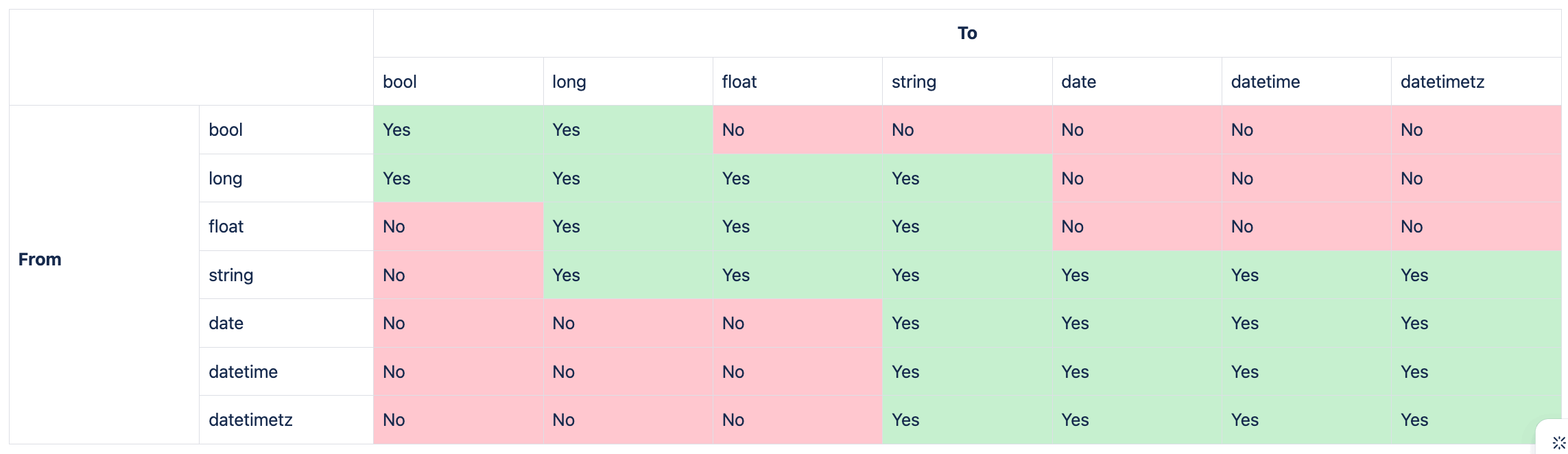
You can use the functions IS_FLOAT, IS_INTEGER, and IS_BOOLEAN to check if a string value is suitable for CASTing into the required data type.
Note: IS_FLOAT and IS_INTEGER don't consider strings that represent numbers with a thousand separators as numbers. Use a formula such as the one below to address the issue:
IF

  IS_FLOAT ( SUBSTITUTE ( 'CC Test'.'New column1' , "," , "" ) )

THEN

  CAST(SUBSTITUTE ( 'CC Test'.'New column1' , "," , "" ),"FLOAT")

ELSE

  0
8.02-08 Be aware of the impact of NULL values on calculations
The underlying calculations performed by ADO are based on SQL. When a value in an expression is NULL, then the result will be NULL. This is the expected behavior from SQL.
ADO includes a Null Value Logic (NVL) function that returns the value of the first expression that is not null:
NVL(expr1 [,expr2, …])
Returns the value of the first expression that isn't null in a series of expressions
In the following example, if Price is NULL then the revenue will also be NULL:
'SalesTrans'.'UnitsSold' * 'SalesTrans'.'Price'
By using NVL, we can have NULL prices replaced by a standard price, and if that is also null replaced by 0, so that there is always a numeric result:
'SalesTrans'.'UnitsSold' * NVL('SalesTrans'.'Price', 'SalesTrans'.'StandardPrice', 0)
Note that the same behavior with regards to NULL applies to string values, aggregations, and indeed any calculation in ADO, so it's important to cater for potential NULL values when building transformations in ADO.
8.02-09 Manage integer and float results in calculated columns
When calculating a new numeric column, that column will inherit the data type of the first expression in the formula — either integer or float.
In the following example, if IntegerValue is an integer, then the result will be an integer even though a result with decimal points would be expected.
'Source'.'IntegerValue'/ 9
To force the result to be a float, amend this to:
CAST('Source'.'IntegerValue', "float") / 9
8.02-10 Code defensively
Use the IS_INTEGER and IS_FLOAT functions to check if the value in a column of type string represents an integer value or a float before using a CAST or TO_NUMBER function.
Test for NULL values or use NVL to avoid unexpected results from a function or mathematical expression.
Check that a divisor is not 0 to avoid divide-by-zero errors.

